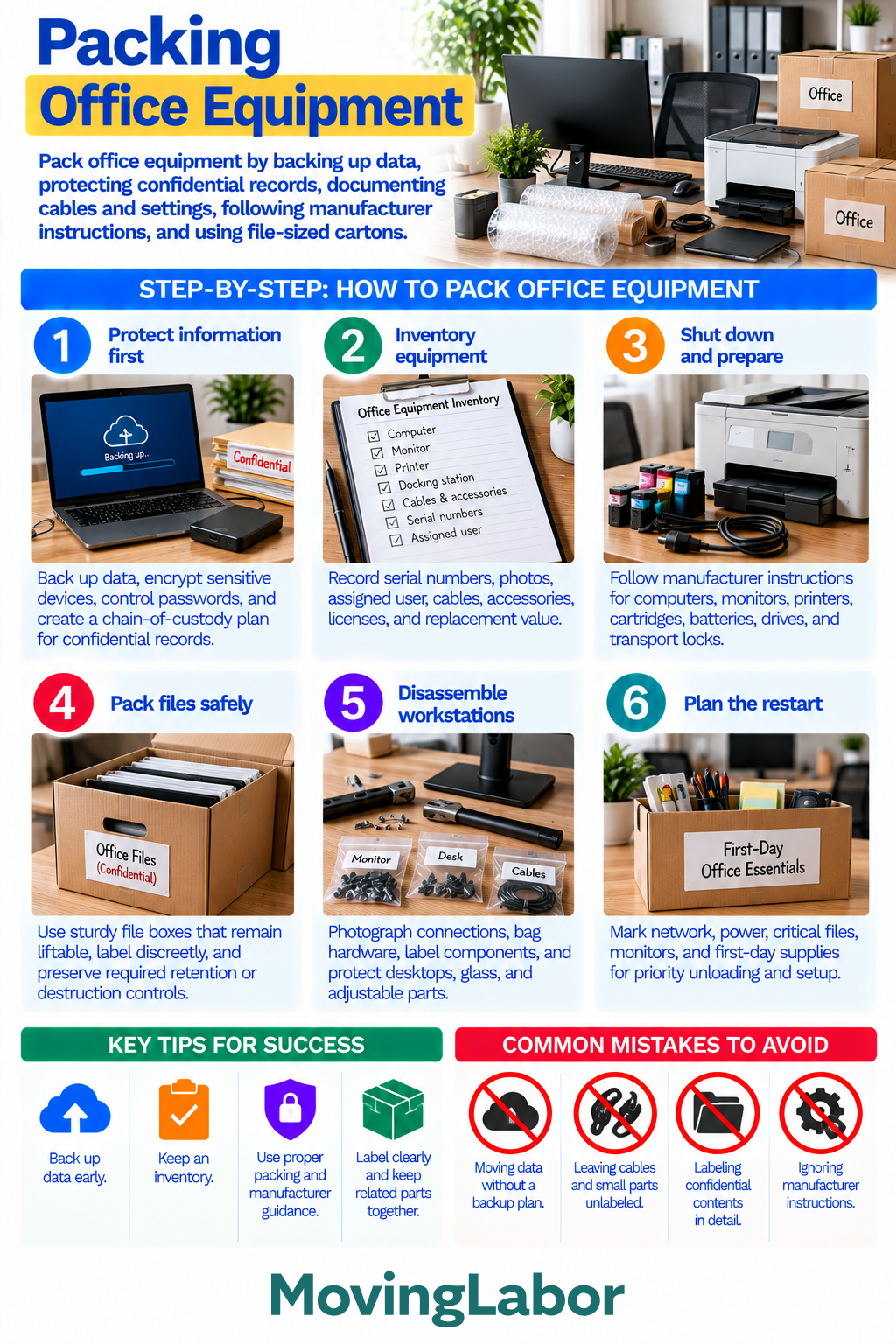
Packing office equipment requires more than protecting hardware. Back up important data, secure confidential records, inventory equipment, organize cables and accessories, follow manufacturer instructions, and plan which workstations need to be operational first after the move.
Keep sensitive information and critical equipment under appropriate control throughout packing, transportation, and setup.
Quick Answer
Before packing office equipment:
- Back up important business data.
- Secure confidential records and sensitive devices.
- Inventory computers, monitors, printers, and accessories.
- Photograph complicated cable connections.
- Label cables and components by workstation.
- Shut down equipment properly before packing.
- Follow manufacturer instructions for printers, batteries, drives, and other components.
- Use sturdy, manageable boxes for files.
- Identify equipment needed for first-day operations.
Keep passwords, credentials, and other sensitive access information separate from ordinary moving boxes.
Step-by-step plan
1. Protect information first
Back up important systems and files before disconnecting office equipment.
Follow your organization's applicable security procedures for confidential or sensitive information. Depending on the office, this may include:
- Encrypting sensitive devices
- Securing passwords and credentials
- Controlling access to confidential records
- Identifying who is responsible for sensitive equipment
- Maintaining appropriate custody of confidential files
Avoid placing sensitive information on exterior box labels.
2. Inventory office equipment
Create an inventory before equipment is disconnected or packed.
Record useful information such as:
- Equipment type
- Serial or asset number
- Assigned employee or workstation
- Cables and accessories
- Photos of the equipment
- Detachable components
Keep related equipment and accessories grouped whenever practical.
3. Shut down and prepare equipment
Completely shut down computers and other electronics rather than leaving them in sleep or standby mode.
Allow equipment to cool before packing.
Follow manufacturer instructions for:
- Computers
- Monitors
- Printers
- Ink or toner cartridges
- Batteries
- Removable drives
- Transport locks
- Detachable stands
- Other specialized components
Do not assume the same preparation method applies to every printer, computer, or electronic device.
4. Pack files and records
Use sturdy file boxes or other suitable containers that protect records without becoming excessively heavy.
Keep files organized according to the office's existing filing or records system where practical.
For confidential records:
- Use discreet exterior labels.
- Avoid identifying sensitive contents unnecessarily.
- Maintain applicable access controls.
- Follow company retention and destruction requirements.
Do not leave confidential records unattended in open staging areas when access needs to be controlled.
5. Disassemble and label workstations
Photograph complicated workstation connections before disconnecting equipment.
Label:
- Monitor cables
- Power cords
- Docking stations
- Adapters
- Desk components
- Mounting hardware
- Other workstation-specific parts
Place small hardware in sealed, labeled bags and keep it associated with the correct workstation.
Protect desktops, glass, monitor screens, adjustable components, and other vulnerable surfaces before carrying or loading.
6. Plan the office restart
Identify which equipment and supplies need priority access at the destination.
Depending on the office, this may include:
- Computers and monitors
- Network equipment
- Power equipment
- Phones
- Critical files
- Printers
- First-day office supplies
Clearly identify priority equipment without exposing sensitive information.
Coordinate the loading and unloading sequence so critical workstations can be accessed without searching through unrelated office contents.
Decision checkpoints
- Before disconnecting equipment: Confirm important data has been backed up.
- Before packing sensitive records: Determine how access and confidentiality will be maintained.
- Before sealing equipment boxes: Confirm cables, accessories, and removable components are labeled and organized.
- Before moving workstations: Photograph complicated connections and secure loose hardware.
- Before loading: Identify equipment and files required for priority setup.
- Before leaving the old office: Confirm critical equipment, records, credentials, and accessories are accounted for.
Office packing checklist
- Important data backed up
- Confidential information secured
- Equipment inventoried
- Asset or serial numbers recorded where useful
- Connections photographed
- Cables labeled
- Accessories grouped by workstation
- Electronics properly shut down
- Equipment allowed to cool
- Manufacturer instructions checked
- Printer components prepared as instructed
- File boxes kept manageable
- Confidential boxes labeled discreetly
- Workstation hardware bagged and labeled
- Screens and vulnerable surfaces protected
- Priority equipment identified
- First-day office supplies separated
Common mistakes to avoid
Moving business data without a backup
Complete applicable backups before equipment is disconnected. Confirm that critical information can be recovered if hardware is damaged or unavailable.
Mixing cables from multiple workstations
A box full of unidentified cables can delay setup. Label cords, adapters, docks, and accessories according to the equipment or workstation they serve.
Packing printers without checking manufacturer instructions
Printer preparation varies by model. Follow instructions for cartridges, toner, trays, transport locks, and transportation orientation.
Exposing confidential information on box labels
Use enough information to route records correctly without describing sensitive contents unnecessarily.
Losing workstation hardware
Bag screws, brackets, mounts, and other small components immediately and identify the workstation or furniture they belong to.
Packing without planning the restart
Equipment needed first should remain identifiable and appropriately positioned so essential workstations can be restored efficiently.
Where professional moving labor fits
Professional moving labor can help carry, load, unload, and place office furniture, boxed records, computers, monitors, printers, and other equipment within the provider's service scope.
Before booking, identify unusually heavy or specialized equipment and confirm whether workstation disassembly, furniture assembly, packing, or equipment placement is included.
Your organization should handle data backups, passwords, confidential-information controls, and other internal security responsibilities before the moving crew arrives. Electrical work, networking, wall mounting, and specialized technology installation may require appropriate technicians rather than general moving labor.
Use Professional packing help or the Packing Materials Calculator to continue planning. For this guide, apply the result to the Protect information first step and confirm the final scope, availability, minimums, and price in writing.