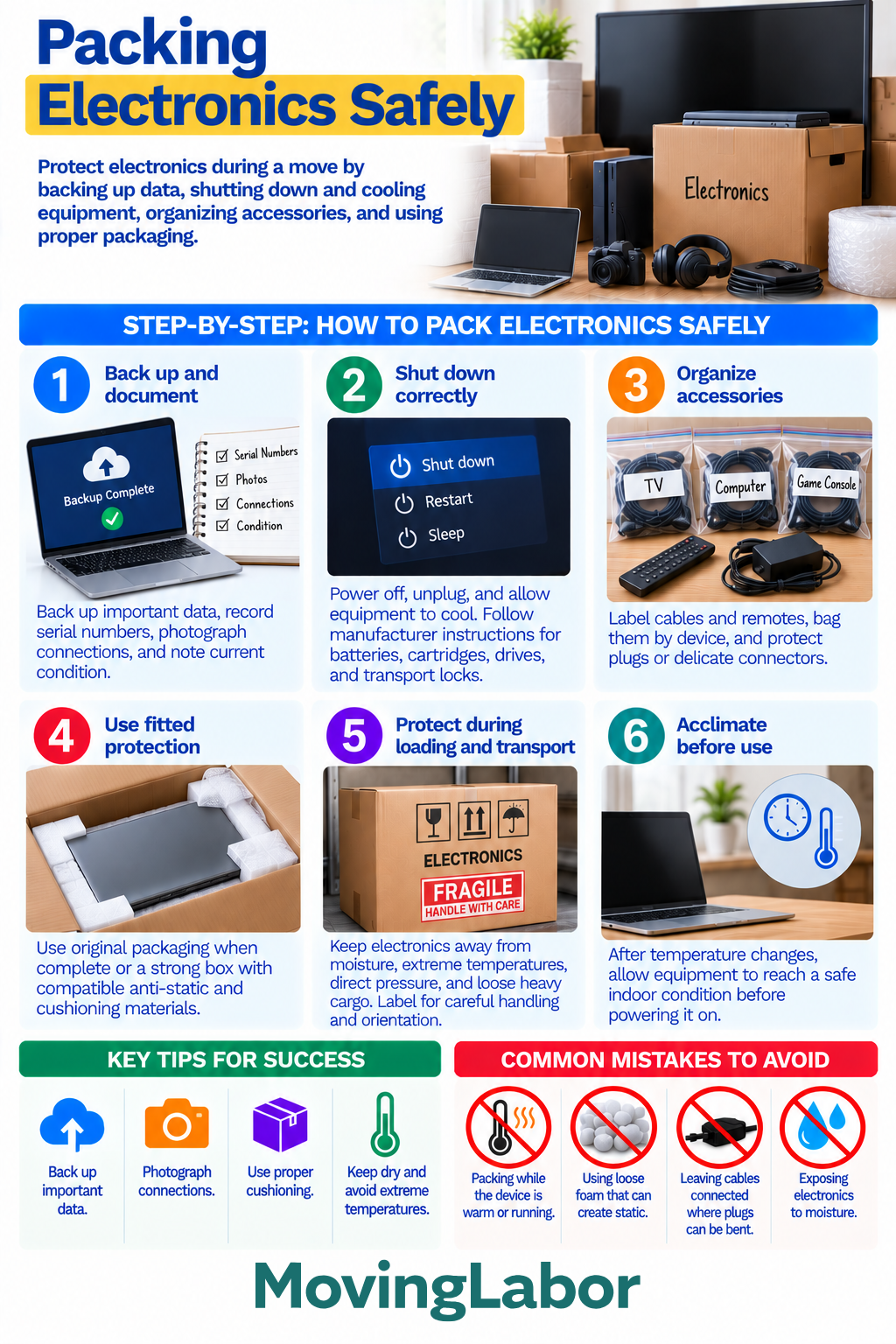
Electronics need protection from impact, pressure, static, moisture, and temperature changes during a move. Before packing, back up important data, shut equipment down properly, photograph connections, organize accessories, and use packaging that prevents the device from shifting inside the box.
Follow the manufacturer's instructions whenever a device has specific requirements for batteries, cartridges, removable components, transport locks, or orientation.
Quick Answer
Before packing electronics, back up important data and completely shut down each device. Photograph cable connections if they may be difficult to recreate, then disconnect and label accessories.
For each device:
- Allow it to cool before packing.
- Remove or secure accessories as appropriate.
- Protect delicate ports and connectors.
- Use the original packaging when it is complete and still suitable.
- Otherwise, use a strong, appropriately sized box with compatible cushioning.
- Prevent the device from shifting inside the carton.
- Keep electronics dry and protected from extreme temperatures.
- Follow manufacturer instructions for batteries and other device-specific components.
Keep laptops, storage drives, and other small electronics containing important or sensitive information with you when practical.
Step-by-step plan
1. Back up and document
Back up important files before disconnecting computers, storage devices, and other electronics containing data.
Before packing:
- Record serial numbers when useful.
- Photograph the device's condition.
- Photograph complicated cable connections.
- Note which accessories belong with each device.
- Confirm that important files are backed up.
Photos can also make reconnecting computers, entertainment systems, and other multi-component setups easier at the destination.
2. Shut down and disconnect correctly
Completely shut down equipment rather than simply putting it into sleep or standby mode.
Unplug the device and allow warm equipment to cool before packing.
Follow the manufacturer's instructions for components such as:
- Batteries
- Printer cartridges or toner
- Removable drives
- Transport locks
- Detachable stands
- Other removable or movable components
Do not force a component to detach simply because removing it would make packing easier.
3. Organize cables and accessories
Disconnect cables when appropriate rather than leaving plugs and ports exposed to unnecessary leverage during handling.
Label cables by device or connection point, then organize them in separate labeled bags or containers.
Keep together:
- Power cords
- Charging cables
- Remotes
- Adapters
- Mounting hardware
- Stands
- Other device-specific accessories
Protect delicate plugs and connectors from bending or crushing.
4. Use fitted protection
Original packaging can be useful when the box, inserts, and supports are complete and remain in good condition.
If the original packaging is unavailable, choose a strong box that provides enough room for suitable cushioning without allowing excessive movement.
Use packaging materials appropriate for the device. Sensitive electronic components may require compatible anti-static protection rather than ordinary loose packing materials.
Protect screens and other vulnerable surfaces from direct pressure.
After packing, the device should not move freely inside the box.
5. Protect electronics during loading and transportation
Clearly label electronics that require careful handling or a particular orientation.
Keep packed electronics away from:
- Moisture
- Loose heavy cargo
- Crushing pressure
- Unstable stacks
- Conditions outside the device's recommended storage or transportation range
Do not place heavy boxes or furniture on top of cartons containing electronics unless the packaging and equipment are specifically designed to support that load.
Follow manufacturer guidance when a device has orientation requirements during transportation.
6. Let electronics acclimate before powering on
Electronics exposed to substantial temperature changes may need time to adjust to the indoor environment before use.
Move the equipment into a dry, temperature-controlled space and follow the manufacturer's guidance before reconnecting or powering it on.
This is particularly important when moving equipment between significantly different temperatures, where condensation may be a concern.
Decision checkpoints
- Before disconnecting: Back up important data and photograph complicated connections.
- Before packing: Make sure each device is completely shut down, unplugged, and cool.
- Before sealing the box: Confirm accessories are organized, vulnerable areas are protected, and the device cannot shift excessively.
- Before loading: Check orientation requirements and keep electronics separated from loose or crushing cargo.
- After arrival: Inspect the package and allow equipment to acclimate when necessary before powering it on.
Electronics packing checklist
- Important data backed up
- Device condition documented when useful
- Cable connections photographed
- Equipment completely shut down
- Device allowed to cool
- Manufacturer instructions checked
- Batteries handled as instructed
- Cables disconnected where appropriate
- Cables and accessories labeled
- Delicate connectors protected
- Strong, appropriately sized box used
- Compatible cushioning used
- Sensitive components protected from static
- Device prevented from shifting
- Screen protected from direct pressure
- Box labeled for handling and orientation when needed
- Electronics protected from moisture and extreme temperatures
Common mistakes to avoid
Packing electronics while they are still warm or running
Completely shut down equipment, unplug it, and allow it to cool before packing.
Using a box with too much empty space
A device that can move freely inside its carton is more vulnerable to impact. Use suitable cushioning to keep it securely positioned.
Using unsuitable packing materials around sensitive electronics
Some electronic components require anti-static protection. Use materials compatible with the device rather than assuming any cushioning material is appropriate.
Leaving vulnerable cables connected
Connected cables can place stress on plugs and ports if they are pulled or bent during handling. Disconnect and organize cables when appropriate.
Putting pressure directly on screens
Protect displays from impact and direct pressure, and do not pack loose accessories where they can press against the screen.
Powering equipment on immediately after a major temperature change
Allow equipment to acclimate when necessary and follow the manufacturer's guidance before powering it on.
Where professional moving labor fits
Professional packing or moving labor can help prepare, carry, load, and unload larger electronics such as TVs, monitors, desktop computers, and entertainment equipment.
Before booking, confirm whether the crew provides electronics boxes, TV cartons, cushioning, moving blankets, or other protective materials. Also confirm whether packing, disconnecting, mounting or unmounting, and other specialized tasks are included.
Back up important data yourself before the crew arrives. Keep passwords, sensitive data, storage drives, laptops, and irreplaceable small electronics with you when practical.
Use Professional packing help or the Packing Materials Calculator to continue planning. For this guide, apply the result to the Back up and document step and confirm the final scope, availability, minimums, and price in writing.